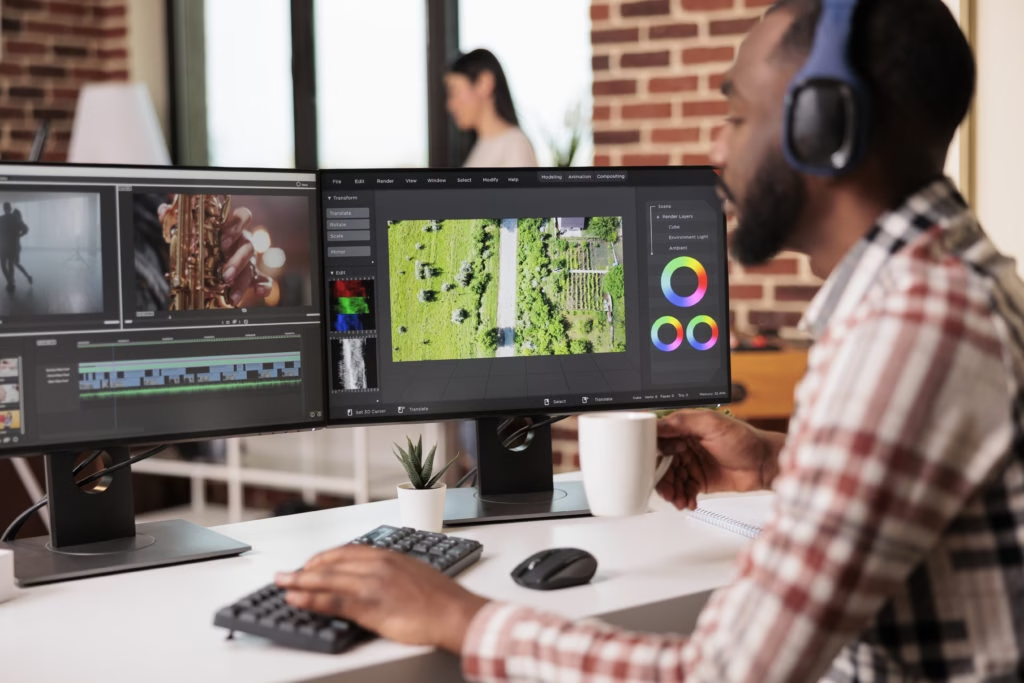
You know that feeling when you film something and then just stare at your computer, wondering where even to start? Yeah, it happens to everyone, starting with video stuff. The good news is that video editing tips really aren’t that complicated once someone shows you what to do. You just need someone to break it down in regular English instead of using weird technical words that confuse you more. Maybe you want to start a YouTube channel, or perhaps you just want your family videos to look decent.
About Video Editing Tips
Video editing tips are basically the cheat codes nobody tells you about upfront. Think of them as the difference between spending six hours on a project versus two hours getting better results than before. Some tips help you stay organized, so you’re not losing files constantly. Others show you tricks that make your videos look expensive when they weren’t. The best part is that these work no matter what software you’re using. Could be fancy Adobe Premiere Pro or free stuff you downloaded last week. Doesn’t matter because good editing principles stay the same across everything basically.
How to Master Video Editing?
Here’s what nobody tells you: You don’t learn editing by watching tutorials forever and doing nothing with that information afterwards. You learn by screwing up a project, figuring out what went wrong, and then trying again next time with the lessons you learned. Start small with one technique at a time instead of everything at once. Get your files organized first because trust me on this one, seriously. Watch stuff you like and pause it to see how they cut scenes together. Then try copying that style in your own videos to practice it. Making actual videos beats watching tutorial videos any day of the week, honestly.
1. Organize Your Footage Before You Start Editing
Create a folder structure: Make folders for everything before importing a single clip into your editor software. I’m talking raw footage folder, audio folder, graphics folder, music folder, the works here. Yeah, it’s boring, but you’ll thank yourself later when you’re not digging through two hundred random files at 2 am trying to find that one specific shot you need desperately.
Use descriptive file names: Stop leaving your clips named “IMG_5849” because you will forget what that is. Rename them to “interview take 3,” “beach sunset wide,” or something. Your future self will want to hug you for this later on. Takes two seconds now, saves twenty minutes later when you’re actually editing.
Import footage systematically: Dump everything into your software at once instead of adding files randomly. Watch each clip and drop markers on the good parts immediately afterwards. Write little notes like “best take” or “audio glitch at 0:15” right there. Sounds like extra work, but it makes editing go 10x faster, I promise.
Color code your clips: See those color labels in your editing software timeline section down there? Use them for real, not just for looking pretty on screen. Make interviews green, B-roll blue, graphics purple, whatever system makes sense to you personally. You can spot what you need without reading every tiny label text.
Back up your project files: This isn’t optional; save everything in three places minimum right now. External hard drive, cloud storage, whatever works, but do it religiously after editing. I’ve watched people lose 40 hours of work from one computer crash. Don’t be that person crying in the corner, please just don’t.
2. Apply Professional Video Editing Techniques
Master the art of cutting: Knowing when to cut between shots is literally half of editing work, honestly. Cut during movement or action so viewers don’t notice the transition happening. Like if someone’s turning their head, cut mid-turn to the next shot. Their eyes follow the motion instead of seeing the cut itself there.
Use J-cuts and L-cuts: This is where audio from the next scene starts playing before the picture changes over to it completely. Sounds complicated, but it’s not – it just makes your transitions feel smooth instead of choppy and amateur-looking to viewers who watch. TV shows and movies do this constantly, and you probably never noticed.
Apply the rule of thirds: Don’t put important stuff dead center in your frame every single time. Use those grid lines put faces and objects where the lines intersect. Makes shots look balanced and professional without even trying hard at all. Your editing software probably has a grid overlay you can turn on.
Match cut for continuity: Connect different shots by matching the shapes or movements between them smoothly. Like someone throws a ball in shot one, cuts to them catching a ball in shot two, even if it’s days later in filming time. Your brain connects them, and it looks slick as hell when done.
Control your pacing carefully: Mix short clips and long clips to create rhythm in your video project. Action scenes use quick cuts, maybe one or two-second clips. Emotional scenes use longer clips hold on to someone’s face for five seconds. Pacing tells viewers how to feel without them even realizing it’s happening.
3. Perfect Your Audio and Sound Design
Balance audio levels properly: Here’s a truth bomb: People will watch an ugly video if the audio’s good. They won’t watch a beautiful video if the audio sucks at all, period. Dialogue should sit around negative 12 to negative 6 dB, usually depending. Music and effects go under that, so they don’t fight the talking parts.
Remove background noise effectively: That annoying hum or buzz in the background ruins everything you filmed completely. Most software has noise reduction; use it generously on problem clips. Or get something like Audacity, which is free and works great. Clean audio makes you look way more professional than fancy camera gear.
Add music strategically: Music sets the whole mood of your video in like three seconds flat. But don’t just slap a song over everything and call it done. Lower the music volume when people talk. This is called ducking. And use royalty-free music from YouTube Audio Library or Epidemic Sound, please. Getting copyright strikes sucks and kills channels fast.
Include sound effects thoughtfully: Little sounds make videos feel alive and real to viewers watching them. Footsteps, door closes, car passes, whatever fits the scene you’re showing there. Don’t go overboard, though; you’re not making a cartoon for kids. Subtle effects that blend in work best for most normal video content.
Record room tone always: This is the secret sauce nobody talks about at all ever. Record 30 seconds of silence at every location you film. Not actual silence, just the room’s natural background noise and ambience. Use this to fill gaps in your edit so silence doesn’t sound weird and wrong somehow to the ears.
4. Enhance Visuals with Color and Effects
Color correct your footage: Before you do anything artistic with color, fix the technical problems first here. Adjust exposure so it’s not too dark or bright everywhere in frame. Fix white balance, so whites look white, not blue or orange. Make all your clips match each other before moving on to grading.
Apply color grading creatively: Now you can make your video look cinematic or moody or whatever. Orange and teal are super popular warm skin tones, cool shadows basically. Or go desaturated for serious documentary vibes that feel important and heavy. Just don’t go crazy, or it looks like you’re trying too hard.
Use transitions sparingly, always: Real talk, most fancy transitions look terrible and scream amateur hour loudly. Stick with straight cuts 90% of the time in your editing work. Use a crossfade when changing scenes or time passing between them. That spinning star wipe thing? Delete it, burn it, never use it.
Add text overlays carefully: Titles and lower thirds give viewers information they need to understand context better. Keep fonts simple and readable. Fancy script fonts look messy on video. Leave text on screen long enough to read twice out loud. If you can’t read it twice comfortably, it’s too fast completely.
Stabilize shaky footage digitally: Got shaky handheld footage that looks drunk and wobbly all over the place? Stabilization tools can save it most of the time, pretty well, actually. Just don’t push stabilization to 100%, or it gets this weird floaty look. 70-80% usually works better and looks more natural to the eyes watching.
5. Optimize Your Video Editing Workflow
Create templates for consistency: Build your intro sequence once with your logo, music, and stuff. Save it as a template and reuse it forever on every project. Same with outros, title cards, lower thirds, all of it, really, basically. Why rebuild the wheel every single time when you don’t have to?
Learn keyboard shortcuts fast: This alone will make you edit probably three times faster, minimum. I’m serious. Print out the shortcuts for your software and tape them next to the screen. J K L for playback control, C for cut, and delete for ripple delete. After a week, they’re burned into your brain muscle memory forever.
Use proxy files wisely: Working with 4K footage on a regular computer? It’s gonna chug and stutter like crazy, trying to play it smoothly at all. Make proxy files smaller, lower quality versions for editing only then. Your timeline plays smoothly, you work faster, and switch back to full quality when exporting. Game changer for older computers, especially here.
Batch process your edits: Need to add the same effect to 50 clips total overall? Do it once, copy it, and paste it to all the others at once. Works for color correction, audio levels, speed changes, all kinds of stuff. Saves you from doing the same adjustment 50 separate times manually, like a robot.
Export in correct formats: Different platforms want different things from your exported video files completely. YouTube likes MP4 with H.264 codec usually at a high bitrate. Instagram wants square or vertical, depending on where it’s going. TikTok wants vertical 9:16 aspect ratio videos, basically. Export wrong, and your video looks like garbage, or won’t upload.
About Mighty Musketeers SEO
At Mighty Musketeers, we’re not some fancy agency pretending to know everything about content creation here. We’re real people who make videos and teach others how to do it better. Our whole thing is showing creators the video editing tips that actually matter in real projects daily. We skip the boring theory and jump straight into hands-on stuff you’ll use. Need help picking software that won’t destroy your computer or wallet? We got you covered there, too.
Want to learn advanced video editing tips without taking a four-month course? That’s literally what we do best for people every day. Our team stays on top of what’s working now in 2026, not outdated information from 2019. We work with beginners making their first YouTube video and experienced creators wanting to level up their game significantly. Whatever you need for professional video editing techniques, we teach it in ways that actually make sense to normal humans. Get in touch, and let’s make your videos stop sucking, finally, please.
Conclusion
So there you have it, actual simple video editing tips for YouTube that work in the real world right now. Stop overthinking this and just start editing something, anything at all, please. Your first videos will probably suck, and that’s completely fine and normal. Every good editor made terrible videos first before getting better gradually. Focus on telling stories people care about instead of adding every effect ever. Best video editing tips and tricks are worthless if your content is boring to watch anyway. Practice these video editing tips on real projects consistently over time.
FAQ
What Are The Best Video Editing Tips For Beginners?
Get organized before you touch anything else, make folders, rename files, whatever. Learn basic cuts and don’t worry about fancy effects yet at all. Just make videos regularly, and you’ll improve way faster than watching tutorials forever.
How Long Does It Take To Learn Video Editing?
It depends on practice – you learn the basics in a few weeks only. Getting good, actually good, where people notice, takes a few months of regular work. An hour a day beats one eight-hour session every weekend, trust me
Which Video Editing Software Should Beginners Use?
Start with something free like DaVinci Resolve, which is actually really powerful. Or iMovie if you’re on Mac, which is super simple and easy. Don’t blow money on Premiere Pro until you know you’ll stick with this.
How Do I Make My Videos Look More Professional?
Fix your audio first because bad audio kills good video every time. Use simple cuts instead of crazy transitions that look cheap and desperate. Get your lighting right when filming so you’re not fixing everything later on.
What Is The Most Important Video Editing Skill?
Knowing when to cut between shots is the most important thing, honestly. You can learn which buttons to press from YouTube videos pretty fast. But understanding how to keep people watching takes real practice and lots of watching.